


The problem: strategy and execution drift apart
Product strategy lives in docs. Roadmaps and backlogs live in Linear. In theory they align. In practice they drift. Someone updates the spec; no one updates Linear. Or the other way around. The source of truth becomes unclear. Manual sync is tedious and error-prone. Copy-paste from markdown to Linear invites mistakes, and when you scale across multiple initiatives and projects, the drift compounds.
We needed a single source of truth—markdown—that could flow into Linear in a structured way, with AI assistance for the mechanical sync work.
The approach: six-file hierarchy + MCP
We use a six-file markdown hierarchy that runs from idea to issues. Markdown is the source of truth; Linear is the execution layer. We sync via the Linear MCP (Model Context Protocol) as the primary path. For steps MCP can’t do—creating initiatives, setting project dependencies—we use the Linear UI or GraphQL API as fallback. The hierarchy keeps strategy and delivery aligned; MCP keeps the sync fast and consistent.
The hierarchy
Execute in order. Each file feeds the next:
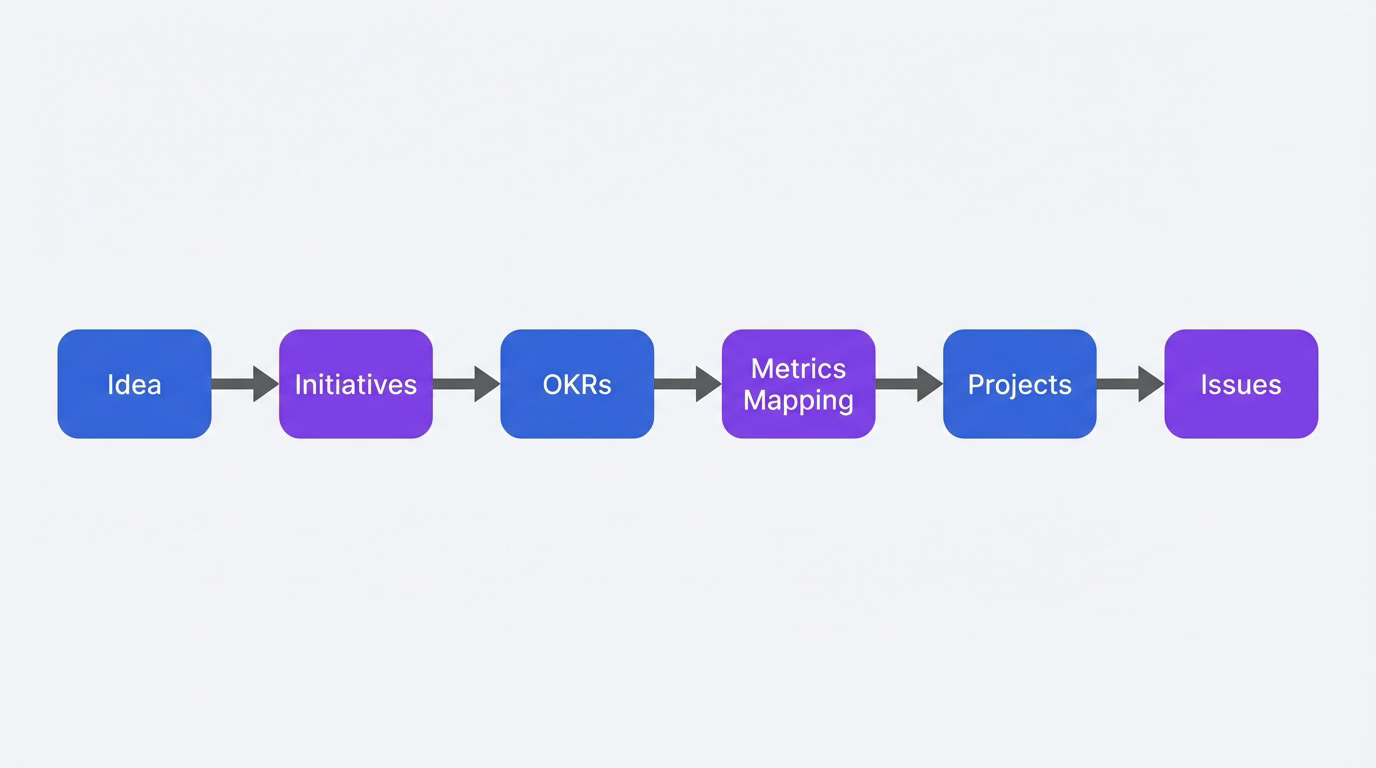
Idea → Initiatives → OKRs → Metrics Mapping → Projects → Issues
Fill 01 before 02, 02 before 03, and so on. IDs (INIT-xxx, PROJ-xxx, ISSUE-xxx) are the contract between markdown and Linear.
Step 1: Idea (01-idea)
The idea file captures the problem, hypothesis, and scope. It’s the source of truth for the “why” behind delivery. Fill this first.
Problem statement — Who experiences the problem? What pain or opportunity is unaddressed?
Hypothesis — Use this formula: We believe that [CHANGE] for [AUDIENCE] will result in [OUTCOME]. We’ll know when [VALIDATION_SIGNAL].
Example from a B2B feedback tool idea:
We believe that an AI-powered async feedback tool that runs sessions and summarizes insights for B2B product and ops teams will result in reduced meeting load, higher response rates, and faster insight delivery. We’ll know when 10 design partners complete 70%+ of sessions and report 50%+ reduction in feedback-related meetings.
Scope (in/out) — A simple table. What’s in scope this quarter? What’s explicitly out?
Assumptions and constraints — Timeline, budget, team size. These shape what you can ship.
Step 2: Initiatives (02-initiatives)
Initiatives are outcome-focused, not feature-focused. Each initiative is a strategic objective that groups projects. Aim for 3–7 per quarter; they span months.
Each initiative has: objective, success criteria (measurable), owner, target date, and linked projects. Use exact names in the “Linear Initiative Names” section—MCP links projects to initiatives by name.
Important: Linear MCP does not create initiatives. You must create them manually in Linear or via the GraphQL API first. MCP then links projects to existing initiatives.
Step 3: OKRs (03-objectives-key-results)
Objectives and Key Results map to initiatives. O1, O2 for objectives; KR1, KR2 for key results. Each KR should be measurable (e.g., “10 design partners onboarded”, “70%+ session completion rate”). Map each OKR to an initiative and to metrics in the next file.
Step 4: Metrics mapping (04-metrics-mapping)
Define your North Star metric, input metrics, and how initiatives/projects map to them. When OKRs or success criteria change, update this file. Include instrumentation notes: what events or properties need to be instrumented? This ensures success criteria are measurable and tied to real data.
Step 5: Projects (05-projects)
Projects are time-bound deliverables. Each has milestones (e.g., Design, Alpha, Beta, Launch), success criteria, and dependencies. Use blocks and blockedBy to express project dependencies. MCP can create projects and milestones; project dependencies are set in Linear UI or GraphQL (MCP doesn’t expose them).
Step 6: Issues (06-issues)
Issues are 1–5 days of work, one owner. Sub-issues decompose when multiple people or smaller shippable pieces are needed. Each issue has project, milestone, success criteria, and optional blocks / blockedBy. Create parent issues first, then sub-issues (using parentId). Set dependencies after all issues exist.
Example: AI Feedback Collector in Practice
Here’s how the six-file hierarchy looks when applied to a real idea. We’ll walk through an “AI Feedback Collector for B2B” concept—a tool that runs async feedback sessions and summarizes insights with AI. The reader can see how each file feeds the next and how IDs link strategy to execution.
Idea → Initiatives
The idea file defines the problem and hypothesis:
Problem: B2B teams spend excessive time on manual feedback collection; response rates are low, insights arrive too late.
Hypothesis: We believe that an AI-powered async feedback tool that runs sessions and summarizes insights for B2B product and ops teams will result in reduced meeting load, higher response rates, and faster insight delivery. We’ll know when 10 design partners complete 70%+ of sessions and report 50%+ reduction in feedback-related meetings.
Scope (in): Async session creation, AI summarization, basic dashboard, design partner onboarding.
Scope (out): Live meeting transcription, full qualitative research platform, Enterprise SSO (Phase 2).
Constraints: 10 partners, 3-month window; 1–2 engineers; Alpha in 8 weeks.
That idea becomes two initiatives:
IDNameSuccess CriteriaTargetINIT-001Launch MVP feedback product10 partners onboarded; 70%+ session completion2025-06-30INIT-002Prove enterprise readinessSOC2 prep; SSO; 3+ enterprise pilots2025-09-30
Initiatives → OKRs
OKRs make the initiatives measurable:
O1 (Ship MVP) → INIT-001: KR1: 10 design partners onboarded; KR2: 70%+ session completion; KR3: 50%+ report reduced feedback meetings.
O2 (Enterprise fit) → INIT-002: KR1: SOC2 prep complete; KR2: SSO available.
Each KR maps to a metric in the metrics file (design partners onboarded, session completion rate, etc.).
Metrics → North Star + Inputs
The metrics file ties outcomes to instrumentation:
North Star: Weekly active feedback sessions (count of completed sessions per week); target 50+ by end of Q2.
Input metrics: Session completion rate (70%+), time to first insight (<24h), design partners onboarded (10).
Instrumentation:
session_created,session_completed,response_received,summary_generated—events that the product DB must track.
Initiatives → Projects
Projects are time-bound deliverables under each initiative:
IDNameInitiativeMilestonesPROJ-001Core feedback flowINIT-001Design → Alpha → BetaPROJ-002AI summarizationINIT-001Model → Integration → PolishPROJ-003Enterprise dashboardINIT-002Dashboard → SSO → Pilot
Dependency: PROJ-002 blocks PROJ-003. The enterprise dashboard needs AI summarization before it can show complete session data. That dependency flows through to issues.
Projects → Issues
Issues break projects into 1–5 day work units. Example from PROJ-002 (AI summarization):
ISSUE-002: Add AI summarization — Project: PROJ-002, Milestone: Integration. Success: summary displayed within 30s of last response.
Sub-issues: ISSUE-002a (BE: Summarization API endpoint), ISSUE-002b (FE: Display summary in session view), ISSUE-002c (Prompt engineering for structured summary).
Blocks: ISSUE-002 blocks ISSUE-003 (Enterprise dashboard overview)—the dashboard depends on summarization being in place.
The Chain in One View
Idea: "AI feedback tool reduces meeting load"
  → INIT-001: Launch MVP (10 partners, 70% completion)
    → PROJ-001: Core feedback flow
    → PROJ-002: AI summarization
      → ISSUE-002: Add AI summarization
        → ISSUE-002a: BE endpoint
        → ISSUE-002b: FE display
        → ISSUE-002c: Prompt engineering
  → INIT-002: Enterprise readiness (blocked by PROJ-002)
    → PROJ-003: Enterprise dashboard
      → ISSUE-003: Dashboard overview (blocked by ISSUE-002)
IDs (INIT-001, PROJ-002, ISSUE-002a) are the contract. When you sync to Linear, MCP links projects to initiatives by name, creates milestones per project, and creates issues with project and milestone. The markdown stays the source of truth; Linear reflects it.
The runbook: syncing to Linear
MCP is the primary path. Manual steps cover what MCP cannot do.
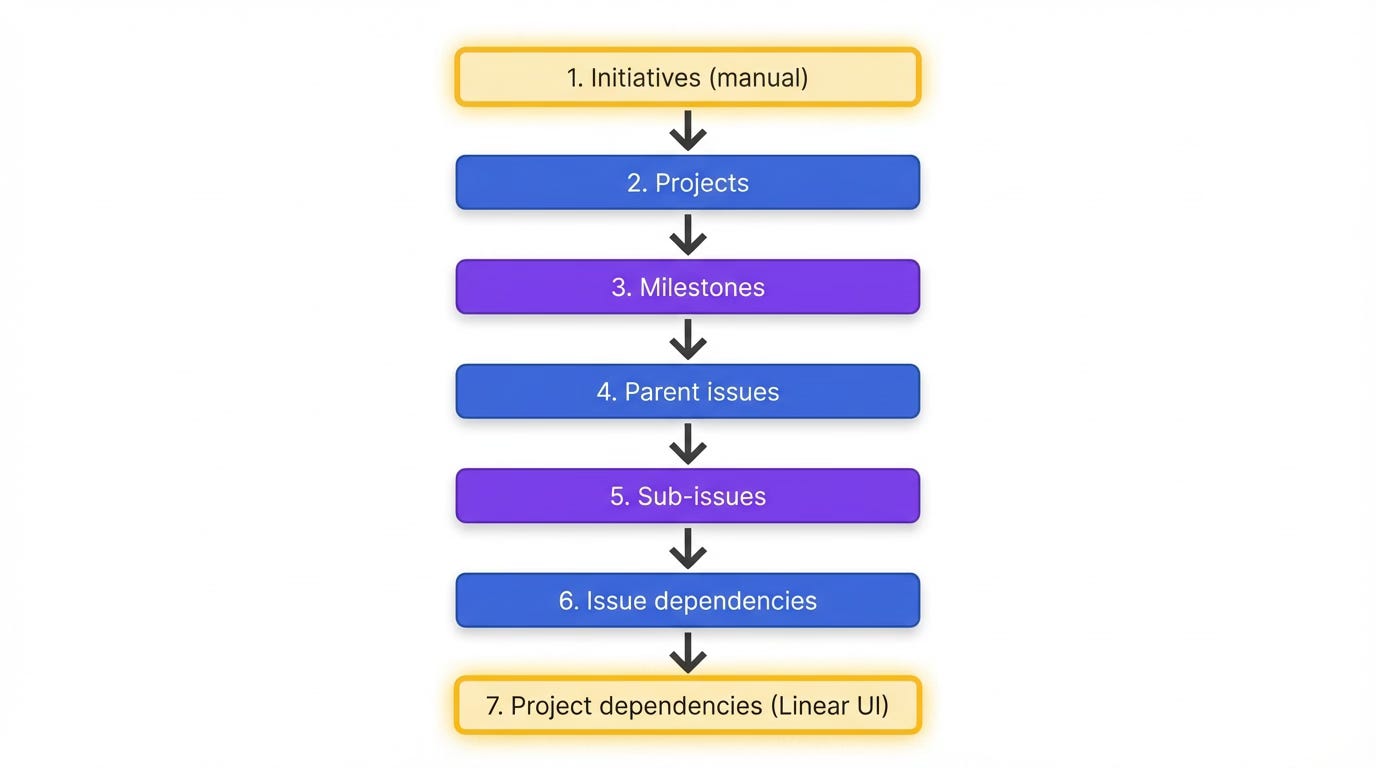
Sync order:
Initiatives — Manual or GraphQL. Use exact names from 02-initiatives.
Projects —
save_project. Link to initiatives by name.Milestones —
save_milestoneper project.Parent issues —
save_issue(no parentId, blocks, or blockedBy yet).Sub-issues —
save_issuewith parentId.Issue dependencies — Update issues with blocks and blockedBy.
Project dependencies — Set in Linear UI: Project → Settings → Dependencies.
MCP tools quick reference:
ToolKey paramssave_projectname, team, initiatives, targetDate, descriptionsave_milestoneproject, name, targetDatesave_issuetitle, team, project, milestone, parentId, blocks, blockedBy, description
Best practices
Fill in order — 01 before 02, 02 before 03. Dependencies flow downward.
IDs as contract — INIT-xxx, PROJ-xxx, ISSUE-xxx link markdown to Linear. Keep them stable.
Sync log — Maintain
_linear-sync-log.mdwith last sync date and ID mapping (Markdown ID → Linear ID). Use this for idempotent updates: pass id to save_project or save_issue to update instead of create.
Takeaway
Strategy and execution don’t have to drift. Markdown as source of truth, Linear as execution layer, and a six-file hierarchy from idea to issues keeps them aligned. Use Linear MCP for the mechanical sync; fall back to the Linear UI for initiatives and project dependencies. The hierarchy scales. The IDs are the contract. Fill in order, sync when ready.